

Introduction: A Busy Blog Isn’t the Same as a Useful One
Most business blogs grow the same way. Someone has an idea, a post goes up, and a few weeks later another one follows. A year or two on, there are dozens of articles, sometimes hundreds, and very little to show for them. Traffic is flat, enquiries from the blog are rare, and nobody can quite say what the blog is for.
The usual response is to publish more. In our experience, that rarely fixes it. What’s missing is usually structure, not volume: a clear set of topics the business wants to be known for, a main page for each, and supporting posts that link together so readers, Google and AI tools can see how it all fits.
That structure has a name: content pillars, also called the pillar-and-cluster or hub-and-spoke model. It’s how we’ve built this blog series, and it’s how we plan content for clients.
This is the second supporting guide in our Content Strategy series, following How to Build a Customer Persona That Actually Improves Your Content. It goes deeper into one section of The Audience-First Content Playbook, and it’s written for business owners and marketing managers who suspect their blog could be working harder. We’ll cover:
- What content pillars and topic clusters actually are, in plain English
- Why a pile of unconnected blog posts tends to underperform
- Why structure matters even more now that AI tools answer so many searches
- How this very series is built, as a worked example you can copy
- A step-by-step way to turn the posts you already have into pillars
What Are Content Pillars?
A content pillar is a broad topic your business wants to be known for, covered by one main page and a group of supporting pages that link to it.
There are three parts, and the names vary depending on who you ask:
- The pillar page (sometimes called the hub) covers the whole topic at a high level. It answers the basic questions someone would have and points to more detail elsewhere.
- The cluster posts (or spokes) each go deep on one part of that topic: a specific question, problem or use case that the pillar page only touches on.
- The internal links tie it together. Every cluster post links back to the pillar, the pillar links out to each cluster post, and related cluster posts link to each other where it helps the reader.
The model was popularised by HubSpot, whose team began experimenting with it in 2016. HubSpot’s report on topic clusters says their early tests found that the more they interlinked related content, the better it placed in search results, although the report doesn’t publish the underlying figures. HubSpot later restructured its own blogs around the model, which we’ll come back to.
“Content pillars” can mean two different things
It’s worth clearing up a common mix-up. In social media marketing, “content pillars” usually means the handful of themes a brand posts about, such as tips, behind-the-scenes and customer stories. That’s a useful idea, but it’s a planning label rather than a structure on your website.
In SEO and content strategy, a pillar is something you can actually click on: a page, with a defined set of pages around it and links between them. That’s the meaning we use in this guide. The two can work together nicely, as your website pillars often make natural social themes too.
Why Random Blog Posts Underperform
None of this means individual blog posts are bad. A single, well-researched article can do brilliantly. The problem is what happens when a blog is built one idea at a time with no plan connecting the pieces. These are the patterns we see most often.
They end up competing with each other
Without a map of what already exists, it’s easy to write about the same thing twice. Then three times. HubSpot found exactly this on its own blogs: it had around ten posts on Instagram tips, with overlapping content and similar URLs, and the team noticed that some were competing with each other because they were so similar. When several of your pages chase the same search, Google has to guess which one to show, and none of them gets the full benefit of your effort.
Nobody can find them, including Google
Random posts tend to live in a date-ordered archive. After a few months, they slip off the first page of the blog, and unless something links to them, they’re hard to reach. Google’s guidance on AI features and your website lists making your content easily findable through internal links among the basics, and Google’s link best practices explain that links help it both find pages and understand them. A post with no links pointing to it is starting from behind.
They don’t add up to anything
Twenty posts on twenty unrelated topics tell a reader, and a search engine, very little about what you’re genuinely good at. Google’s own guidance on creating helpful, reliable, people-first content asks site owners whether their site has a primary purpose or focus. It also lists, as a warning sign, producing lots of content on many different topics in the hope that some of it might perform well in search results.
That’s a fair description of how many business blogs are run, usually with the best of intentions.

Volume alone doesn’t bring traffic
More posts don’t guarantee more visitors. When Ahrefs studied around 14 billion pages in its database, it found that 96.55% got no traffic from Google at all. The study dates from December 2023, so treat the exact figure with care, but the reasons it gave haven’t changed: no one was searching for the topic, the page had no links, or it didn’t match what searchers wanted.
In other words, publishing isn’t the hard part. Publishing things people need, and making sure they can be found, is.
More pages means more to maintain
Every post you publish needs checking, updating and eventually merging or removing. A large archive of loosely related posts is hard to keep accurate, and outdated pages can end up being the version of your business that people, and AI tools, come across.
There’s a harder edge to this as well. Google’s spam policies now include scaled content abuse, which covers generating many pages mainly to manipulate rankings rather than help people, however those pages are produced. Most small business blogs are nowhere near that line, but it does show which way the wind is blowing for volume-first content, particularly now that AI makes it so easy to produce.
Random posts vs content pillars at a glance
| Random blog posts | Content pillars | |
| How topics are chosen | Whatever comes up that week | From a short list of topics tied to what you sell and what customers ask |
| How pages connect | Through a date-ordered archive, if at all | Each post links to its pillar page and to related posts |
| What a reader finds | One article, then a dead end | A clear next step to more detail or the bigger picture |
| What Google and AI tools see | Scattered pages on unrelated subjects | Thorough, linked coverage of a few clear topics |
| How you measure it | Post by post, which is noisy | Topic by topic, which shows the trend |
| How you maintain it | Hard to spot duplicates and gaps | Gaps and overlaps are visible on one plan |
Why Structure Matters Even More in AI Search
If anything, the arrival of AI search has made structure more valuable, not less. There are three reasons.
AI answers are built from many smaller searches
When someone asks Google’s AI Mode or AI Overviews a detailed question, the answer often isn’t based on one search. In its guide to AI features, Google says both may use a technique it calls “query fan-out”, running several related searches across subtopics and data sources to put a response together.
That’s a good description of what a pillar and its clusters are designed for. A pillar page covers the broad question, and the cluster posts answer the more specific questions that sit underneath it. A site with one thin page on a topic has fewer chances to be useful when an answer is assembled from many sub-questions. A site that covers the topic properly, across linked pages, has more.
We’d add a word of caution here. Nobody outside Google knows exactly which sub-searches it runs for a given question, and no structure guarantees you’ll be cited. What a pillar-and-cluster setup does is make sure the answers exist on your site, are easy to find, and clearly belong together. We explain how AI Overviews choose their sources in How Google AI Overviews Work.
Clear, consistent answers are easier for AI tools to use
As we covered in our beginner’s guide to Generative Engine Optimisation (GEO), AI tools are more likely to use sources that are clear, direct and consistent. A planned cluster helps with all three. Each post has one job, so it can answer its question early and plainly. And because posts are planned together, you’re far less likely to end up with three slightly different explanations of the same thing on your own site.

AI has made volume cheap
Anyone can now produce a hundred blog posts in an afternoon. That means sheer output is no longer much of an advantage, because everyone has access to it. What’s harder to copy is a well-organised body of work built around what your customers actually ask, written by people with real experience of the subject. That’s the kind of content the next two sections are about building.
A Worked Example: How We Built This Series
The easiest way to explain the model is to show it. This blog series is built exactly this way, and you’re reading one of its cluster posts now.
After BrightonSEO 2026, we turned our seven-part conference recap into a 12-month content programme of 52 weekly posts. It has five pillars, each with its own pillar page: AI search and GEO, technical SEO, content strategy, digital PR, and measuring SEO results. Here’s how it fits together:
- One roadmap post introduced the series and the five themes.
- Five pillar pages were published before the cluster posts began, so every later post would have a home to link to.
- Forty-six cluster posts follow, one a week, rotating between the five pillars so each one grows steadily rather than in bursts.
This is how the Content Strategy pillar looks:
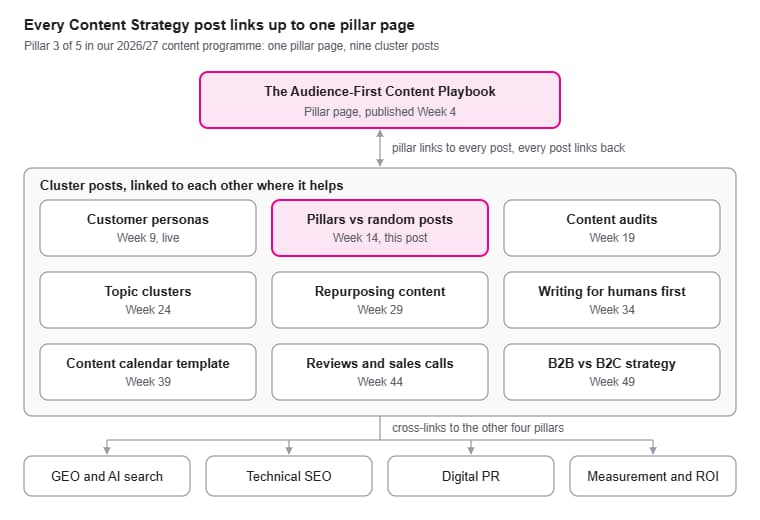
Content Strategy pillar · 1 pillar page, 9 cluster posts
Every post in the pillar links back to the pillar page, and the pillar page links out to each post as it goes live. Posts also link sideways where it helps the reader. This post links to the persona guide, for example, because choosing pillars is much easier once you know who you’re writing for.
Links also cross between pillars where the topics genuinely overlap. Our persona guide links to the GEO pillar because understanding your audience matters even more in AI search, and our digital PR posts link to GEO because brand mentions feed AI visibility.
Each post in the plan also comes with a target topic, a stage in the buyer’s journey, the internal links it needs and a call to action, all agreed before anyone starts writing. That’s the practical difference between a content plan and a list of blog ideas: every post knows where it fits before it exists.
What BrightonSEO 2026 Told Us About Structure and Volume
Content strategy came up in many of the sessions Paul and I attended at BrightonSEO 2026, and we covered the wider themes in our recap, The End of Content for Content’s Sake. Several talks landed on the same conclusion from different directions: more content isn’t the answer, and structure is what makes content work.
- “Random acts of marketing” don’t get results. Anu Ramani of Isoline Communications argued that AI tends to magnify whatever state your content is already in, organised or not. Her framework rests on message (a clear intent for each piece), architecture (how content is tagged and organised) and process (a cycle of creating, publishing, measuring, then updating or retiring content). Her summary was memorable: no piece of content should be created without a clear intent, without being properly organised, or without a plan for keeping it up to date.
- Lots of traffic isn’t the same as useful traffic. Daniel Cartland of Novos shared a client whose blog drove around half of the site’s sessions but only about 7% of its revenue, a gap he linked to how well the business understood who it was writing for.
- Stop chasing volume, start chasing understanding. Sophie Coley of Propellernet made the case that search volume, and especially the prompt volume figures some AI tools now offer, is a shaky foundation for planning. Her advice was to build content around a deep understanding of the audience instead, a theme we picked up in our customer persona guide.
Paul’s take: “The ‘random acts of marketing’ line got a knowing laugh in the room, and I think that’s because most of us have been guilty of it. A client asks for four blog posts a month, four blog posts appear, and a year later nobody can say what they were for. Since Brighton, the first thing we ask about any new piece of content is which pillar it belongs to. If the answer is ‘none of them’, we either rethink the piece or question whether it needs writing at all.”
How to Move From Random Posts to Content Pillars
You don’t need to start again. Most businesses with an established blog already have the raw material for two or three pillars. It just needs sorting, joining up and filling in. This is the process we follow with clients, simplified for doing it yourself.
Step 1: List what you already have
Export a list of every blog post and key page on your site. Your CMS can usually do this, or you can use the Pages report in Google Search Console. Add a column for the main topic of each one, and another for how it’s performing (clicks and impressions from Search Console are enough to start).
Don’t worry about getting it perfect. The aim is to see your content as a whole for the first time.
Step 2: Choose a small number of pillars
Look for the three to five topics that sit where three things overlap: what you sell, what your customers regularly ask about, and what you can speak about with genuine experience. For a plumbing business, that might be hot water systems, bathroom renovations and blocked drains. For an accounting practice, it might be tax for sole traders, business structures and cash flow.
If you’ve built a customer persona, this is where it pays off. The questions and problems you found in your research are your best guide to which pillars matter.
Step 3: Create or choose the pillar page for each
Sometimes you’ll already have a strong page that can become the pillar with some expansion. Often you’ll need to write one. A good pillar page:
- Explains the whole topic clearly enough that a newcomer could follow it
- Answers the most common questions briefly, then links to the cluster posts for detail
- Links to your relevant service page, so readers have a next step
- Is kept up to date, because it’s the page everything else points to
Step 4: Sort your existing posts into clusters
Go back to your list and assign each post to a pillar. You’ll usually find three kinds of post:
- Keepers that fit a pillar and are worth linking up as they are
- Overlaps where two or more posts cover much the same ground. HubSpot dealt with these by merging them into the best-performing page and redirecting the rest, which is a sensible approach for most sites
- Orphans that don’t fit any pillar. Some are worth keeping for other reasons, but many can be updated to fit, merged or retired
We’ll cover how to make these keep, update, merge or remove decisions properly in our upcoming guide to running a content audit.
Step 5: Join everything up with internal links
This is the step that turns a list into a structure. Make sure every cluster post links to its pillar page, the pillar page links to every cluster post, and cluster posts link to each other where it genuinely helps the reader.
Use descriptive link text that tells people what they’ll get, such as “how to choose a hot water cylinder”, rather than “click here”. Google’s link best practices recommend this, and it helps readers too.
Paul’s take: “When we take on a client with an established blog, we nearly always find more content than they need and less structure than they need. The quickest wins usually come from merging and re-linking what’s already there, before we write a single new word. It’s not the exciting part of content marketing, but it’s often where the results come from.”
Step 6: Fill the gaps with a planned calendar
Once your clusters are mapped, the gaps become obvious: the questions customers ask that you haven’t answered yet. Those become your content calendar. Plan new posts by pillar rather than by whatever comes up that week, and rotate between pillars so each one grows steadily.
Step 7: Measure by pillar, not just by post
Individual posts go up and down for all sorts of reasons. Grouping your results by pillar gives you a much clearer picture of whether your authority on a topic is growing. In Search Console, you can filter by page to compare a pillar and its cluster posts against the same period last year. We go into reporting in more depth in How to Measure and Prove SEO ROI When Clicks Are Declining.
How many pillars do you need?
Fewer than you might think. For most small and medium businesses, three to five is plenty, and starting with one or two done properly is better than five done halfway. You can always add more once the first ones are established. Each pillar should be broad enough to support several cluster posts, but specific enough that you can genuinely cover it well.
Four Content Pillar Myths Worth Ignoring
“Google rewards sites that publish more often”
There’s no rule that says more frequent posting earns better rankings. Google’s guidance on helpful content goes further, warning against adding lots of new content or removing older content mainly to make a site look fresh. Publish when you have something useful to add to a pillar, and spend the rest of the time improving what’s already there.
“A pillar page has to be thousands of words long”
Google states plainly that it doesn’t have a preferred word count. A pillar page needs to cover its topic well enough to be useful and to point readers to the detail. For some topics, that’s a long guide. For others, it’s a clear, well-organised page of a more modest length.
“Topic clusters are just an SEO trick”
The internal links in a cluster help search engines, but they were always meant to help people first. A reader who lands on a detailed post can step back to the bigger picture, and a reader on the pillar page can dig into the part that matters to them. If a link wouldn’t help a reader, it doesn’t belong in the cluster.
“This only works for big brands with big blogs”
The opposite is often true. A small business can’t out-publish a national competitor, so it makes sense to be the clearest, most useful source on the few topics where it has real expertise and local knowledge. Three well-built pillars are realistic for almost any business, and they’re far easier to keep accurate than a hundred unconnected posts.
Where to Go Next in This Series
Content pillars are the backbone of an audience-first content strategy. The Audience-First Content Playbook sets out the full approach, including how pillars fit with customer personas, content audits and a repeatable production workflow. If you haven’t yet worked out who your content is for, start with How to Build a Customer Persona That Actually Improves Your Content. And if AI visibility is your main concern, The Complete Guide to Generative Engine Optimisation (GEO) shows how a well-structured site feeds into it.
Over the coming months, we’ll also be publishing:
- The Content Audit: How to Find and Fix Your Underperforming Pages
- Topic Clusters Explained: How to Build Topical Authority Step by Step
- How to Repurpose One Piece of Content Into 10 (Without Losing Quality)
- Writing for Humans First: How to Balance SEO and Readability
- The Content Calendar Template We Use for Clients
- How to Use Customer Reviews and Sales Calls to Generate Content Ideas
- B2B vs B2C Content Strategy: What Actually Changes
Follow us on LinkedIn so you never miss a post.
Give Your Content Something to Hold It Together
Publishing more is the easy part. Making each post part of something bigger is what turns a blog from a to-do list into a genuine asset, for your readers, for Google and for the AI tools your customers are increasingly using.
The good news is that you probably have more to work with than you think. A few well-chosen pillars, some honest decisions about what to keep, and a set of sensible internal links can change how your whole site performs.
Book a Content Strategy Session with Digital Hothouse. We’ll review what you’re currently publishing, help you choose the pillars that matter most to your business, and map your existing content into a practical plan, including what to merge, what to update and what to write next.
We’d love to work with you. Let’s chat.